
Appearance
How new leads arrive
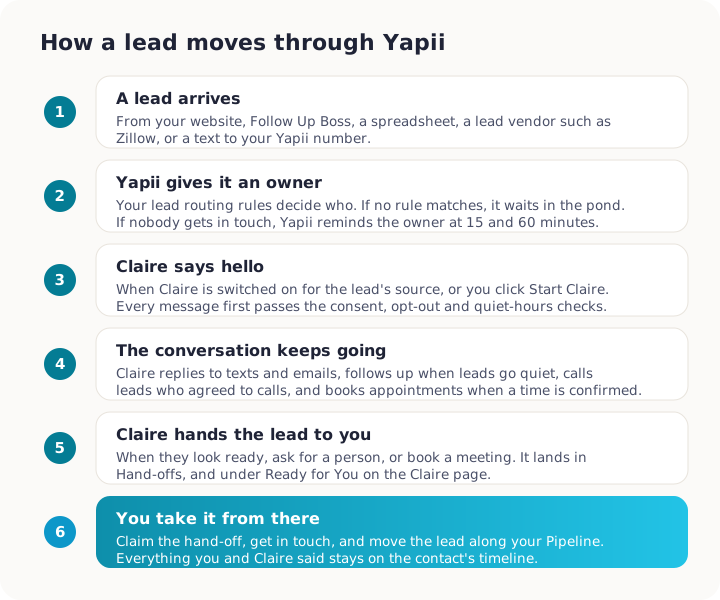
A new lead can reach Yapii in several ways. Whichever way it comes in, Yapii gives it an owner, and depending on your settings it may start a follow-up sequence and have Claire say hello.
Where leads come from
| Source | How it gets into Yapii |
|---|---|
| Your website forms and landing pages | Someone fills in a Yapii form or landing page. Their consent to be contacted is recorded from the form. |
| Follow Up Boss | New people in Follow Up Boss sync into Yapii automatically. |
| Spreadsheet imports | Contacts you upload (see Importing contacts). |
| Lead vendors | Tools such as Zillow, Realtor.com or Landvoice can send leads to a Yapii web address your admin sets up. |
| Portal lead emails | Lead emails from portals such as Zillow or Realtor.com can be turned into contacts. |
| Texts from unknown numbers | Someone texts your Yapii number and isn't a contact yet. Yapii creates a contact for them. |
| You | You add a contact by hand. |
What happens next
1. The lead gets an owner
If your workspace has lead routing rules, Yapii uses them to decide who gets the lead. If no rule matches, the lead waits in the pond (unassigned) where agents can claim it. A lead that already has an owner is never reassigned.
Owners and admins
Set up lead routing in Settings, under Lead Routing.
A rule can match on:
- the lead's source;
- lead type;
- state, city or ZIP;
- tags;
- price.
It then shares leads out in one of three ways:
- round robin (everyone in turn);
- weighted (some people get more);
- first to claim (everyone is notified and the first to claim wins).
A rule can also send the lead to a particular pond, start a sequence, or send an automatic text reply during legal texting hours. Use Test a lead to check which rule would catch a lead before you save.
The new owner gets a notification that a lead has arrived.
2. Follow-up may start
Depending on your settings, a new lead can:
- start a sequence of emails and texts;
- start a conversation with Claire, if the workspace owner has switched Claire on for that lead source. See Meet Claire.
3. Nobody forgets it
If a lead has an owner but nobody has contacted them yet, Yapii nudges the owner:
- after 15 minutes, a warning;
- after 60 minutes, an urgent alert.
These arrive in the app, by email and by text. If several leads are waiting, they're combined into one summary.
Claiming a lead from the pond
In team workspaces with a shared pond:
- Open Contacts and choose Pond Leads in the Lists panel.
- Open the lead and click Claim.
If someone else claimed it a moment before you, Yapii tells you.
Troubleshooting
A new lead didn't get assigned to anyone. No routing rule matched, so it's in the pond. Ask your admin to check the rules, or claim it.
Claire didn't contact a new lead. See Why hasn't Claire contacted my new lead?.