
Appearance
Meet Claire
Claire is your AI assistant. She works in the background, following up with your leads by text, email and phone so fewer of them go cold. When a lead is ready to talk to a person, she hands them to you.
What Claire does
- Says hello to new leads, usually within minutes, from sources your workspace has switched on for her.
- Keeps conversations going. She replies to leads' texts and emails, answers their questions, and follows up if they go quiet.
- Calls leads who have agreed to phone calls, and can put a lead through to you.
- Books appointments when a lead clearly confirms a time.
- Hands leads to you when they're ready, ask for a person, or send a message she shouldn't answer on her own. See Hand-offs.
Where to find her
Click Claire in the sidebar. The Claire page shows:
- Tiles at the top: active conversations, this week's reply rate, signals and pending hand-offs. Click a tile to filter the list.
- Conversations tab:
- a weekly summary;
- Ready for You: leads Claire has handed over;
- the list of every conversation, with filters for status (Active, Awaiting reply, Stalled, Paused, Completed and more), source and channel.
- Analytics tab: how Claire is doing over the last 7, 30 or 90 days, including reply rates, hand-offs and call results.
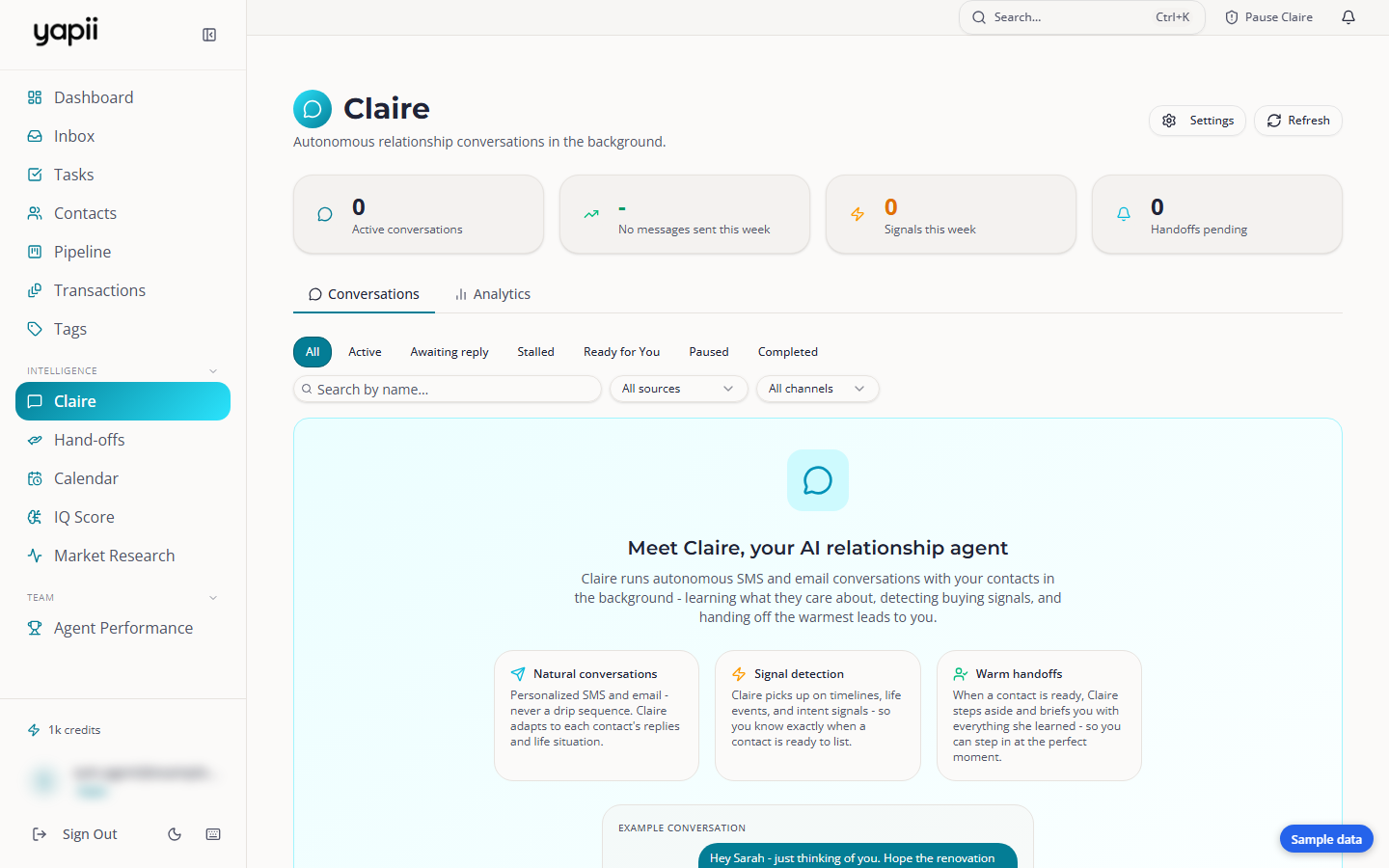
Click a conversation to read the whole thread and the calls, see what Claire knows about the person, and use the controls described in Approving, pausing and taking over.
When Claire starts talking to someone
Claire only reaches out to people who fit all of your rules. She starts on a contact when:
- the lead comes from a source your workspace owner has switched on for her, such as your website form or a particular portal;
- a homeowner claims their home value dashboard and agrees to be contacted (see Monthly home value email);
- a contact gives consent to be contacted, for example by replying YES;
- you click Start Claire on a contact.
Even then, every message still has to pass Yapii's safety checks:
- the contact must have agreed to be contacted;
- they must not have opted out or be marked Do Not Contact;
- it must be within the allowed hours.
How she behaves
| Question | Answer |
|---|---|
| When does she text and email? | Not during quiet hours: by default 8 PM to 9 AM in the lead's local time. If a lead wrote within the last hour, she can reply right away. |
| When does she call? | Only leads who agreed to calls, only when your workspace is set to Auto-send, and only within your calling hours. |
| How fast does she reply? | About two minutes after a lead writes. Instant replies look robotic, and phone carriers can filter them. |
| Does she say she's an AI? | If someone asks, always. On a first message she adds a short AI notice where the rules require it. That includes California, Texas and Illinois, and any lead whose state is unknown. |
| What about other languages? | She continues in Spanish, French or Portuguese. For other languages she replies once politely and hands the lead to a person. |
| Does she read my personal inbox? | No. She answers replies to her own texts and emails. Replies sent to your personal Gmail or Outlook address stay with you. |
Hold for approval or Auto-send
Your workspace decides how much Claire does on her own:
- Hold for approval. Claire writes each message and waits until someone approves it. This is how new workspaces start.
- Auto-send. Claire sends on her own, but still inside every safety rule. Messages to leads in a sensitive group (hot leads, by default) still wait for approval.
How to approve messages is covered in Approving, pausing and taking over.
Claire's settings
Workspace owners
The workspace-wide settings are on the Claire page under Settings, and only the workspace owner sees them.
The owner can set:
- whether Claire is on at all;
- whether she reaches out to new leads automatically, and which lead sources she works;
- a daily limit on new leads she starts (50 by default; extra leads wait until tomorrow);
- Hold for approval or Auto-send;
- quiet hours;
- optional call blocks: a daily hour when she calls the leads who are due;
- how she closes a call: offer to put the lead through to you, or push to book an appointment;
- a fallback phone number for transfers;
- her name, tone and background, and her voice settings.
Your own settings: My Claire
Everyone, not only the owner, has My Claire on the same Settings panel. It only affects contacts assigned to you:
- Claire works my leads: turn it off to stand Claire down on your contacts.
- Your name as Claire should say it, your track record and a short bio.
- How she closes calls for you, and the number she rings to put leads through.
- What Claire has learned about working with me: preferences she picked up from drafts you edited. Delete anything that's wrong.
Your writing style
Claire can learn to sound like you from the messages you send and the drafts you edit. She shows you what she noticed, and nothing is used until you confirm with Yes, that's me. It changes how she phrases things, never what she's allowed to say.